.png)
.avif)

Desktop publishing software has become an essential tool for designers, marketers, content creators, and businesses that produce visual materials regularly. Whether you're preparing brochures, books, magazines, PDFs, catalogs, reports, or social media assets, choosing the best desktop publishing software in 2026 determines your workflow efficiency and output quality.
Modern DTP tools combine page layout capabilities, typography control, collaboration features, and automation options. According to TechRadar’s latest desktop publishing software review, the shift toward cloud-based and AI-supported features continues to redefine how teams handle print and digital publishing in 2026. Compared to older “page making software,” today’s solutions are cloud-synced, AI-enhanced, and optimized for both print and digital publishing.
This guide explores 8 popular desktop publishing software examples, compares their strengths, and helps you choose the right page layout program based on skill level, project complexity, and budget.
Our 8 Top Picks for Desktop Publishing Software in 2026
Adobe InDesign
Adobe InDesign remains the industry standard for professional desktop publishing programs, dominating publishing houses, agencies, and enterprise teams. It offers unmatched control over typography, grids, object styles, and multi-page layouts.
Best for: advanced designers, editorial teams, large-scale publishing
Key features:
- Master pages and layout automation
- Adobe Fonts & Creative Cloud integration
- Preflight print checks
- Advanced PDF export settings
Pricing: subscription-based
Why it stands out: in 2026, InDesign continues to lead the dtp publishing market because of powerful collaboration tools and exceptional precision.
Affinity Publisher 2
Affinity Publisher has become one of the fastest-growing desktop publishing applications, especially after the 2024-2025 shift toward one-time-purchase software instead of subscriptions.
Best for: small studios, freelancers, print designers
Key features:
- StudioLink integration with Affinity Photo & Designer
- Smooth handling of large documents
- One-time purchase instead of recurring fees
Pricing: fixed license
Why it stands out: a strong alternative to Adobe InDesign for users seeking professional tools without subscription costs.
QuarkXPress
QuarkXPress has a long legacy in the page layout program niche and remains widely used in publishing, packaging, and corporate design.
Best for: agencies and publishers needing precise typography & print control
Key features:
- AI-assisted layout creation
- Extensive print-ready output tools
- Vector and image editing capabilities
Pricing: one-time license + optional upgrades
Why it stands out: faster performance and deeper typographic control compared to many desktop publishing software examples.

Alex Lozitsky
Co-founder and CEO
Microsoft Publisher
Microsoft Publisher is an accessible option for beginners and non-designers.
Best for: small businesses, internal documentation, simple brochures
Key features:
- Easy learning curve
- Microsoft 365 integration
- Drag-and-drop templates
Pricing: included in Microsoft 365
Why it stands out: one of the simplest desktop publisher tools for small teams and non-professional designers.
Canva
Canva has evolved into one of the most widely used online desktop publishing tools, offering thousands of templates and real-time collaboration.
Best for: marketers, social media teams, educators
Key features:
- Cloud-based drag-and-drop interface
- Large template and asset library
- Real-time collaboration
- AI design suggestions
Pricing: free + Pro subscription
Why it stands out: extremely fast content creation for non-designers, though limited for complex page layouts.
Marq (formerly Lucidpress)
Marq is a browser-based desktop publishing software widely used by enterprises for brand consistency and smart templates.
Best for: organizations with multi-user workflows
Key features:
- Brand asset control
- Smart templates that auto-update
- Integrations with CRM, CMS, and marketing tools
Pricing: subscription-based
Why it stands out: ideal for companies managing large volumes of branded documents.
Scribus
Scribus is one of the best free dtp software list options, especially for open-source enthusiasts.
Best for: students, non-profits, budget-conscious users
Key features:
- Free and open-source
- Strong prepress features
- Supports CMYK and ICC color profiles
Pricing: free
Why it stands out: a robust free alternative for print layouts, though the UI feels outdated.
Xara Page & Layout Designer
Xara’s toolset is a hybrid of page making software and graphic design functionality.
Best for: SMEs and designers wanting speed & simplicity
Key features:
- Fast rendering engine
- Built-in image editing
- Easy multi-page document creation
Pricing: one-time purchase or subscription
Why it stands out: great for users who want a simplified yet capable desktop publishing program.
Comparing the 8 Best Desktop Publishing Tools
Choosing the right desktop publishing software in 2026 depends on several factors: your skill level, type of projects, need for collaboration, and whether you prefer a one-time purchase or subscription model. While all eight tools covered above qualify as strong page layout programs, each of them serves a slightly different purpose.
Professional designers typically prioritize layout precision, color management, and prepress tools, which makes Adobe InDesign and QuarkXPress the top choices. Teams looking for fast content production often prefer web-based desktop publishing tools like Canva or Marq. Meanwhile, users seeking affordability or open-source flexibility often choose Affinity Publisher, Scribus, or Xara.
To help you quickly compare features at a glance, here’s a simplified overview of how each tool positions itself in the 2026 desktop publishing landscape:
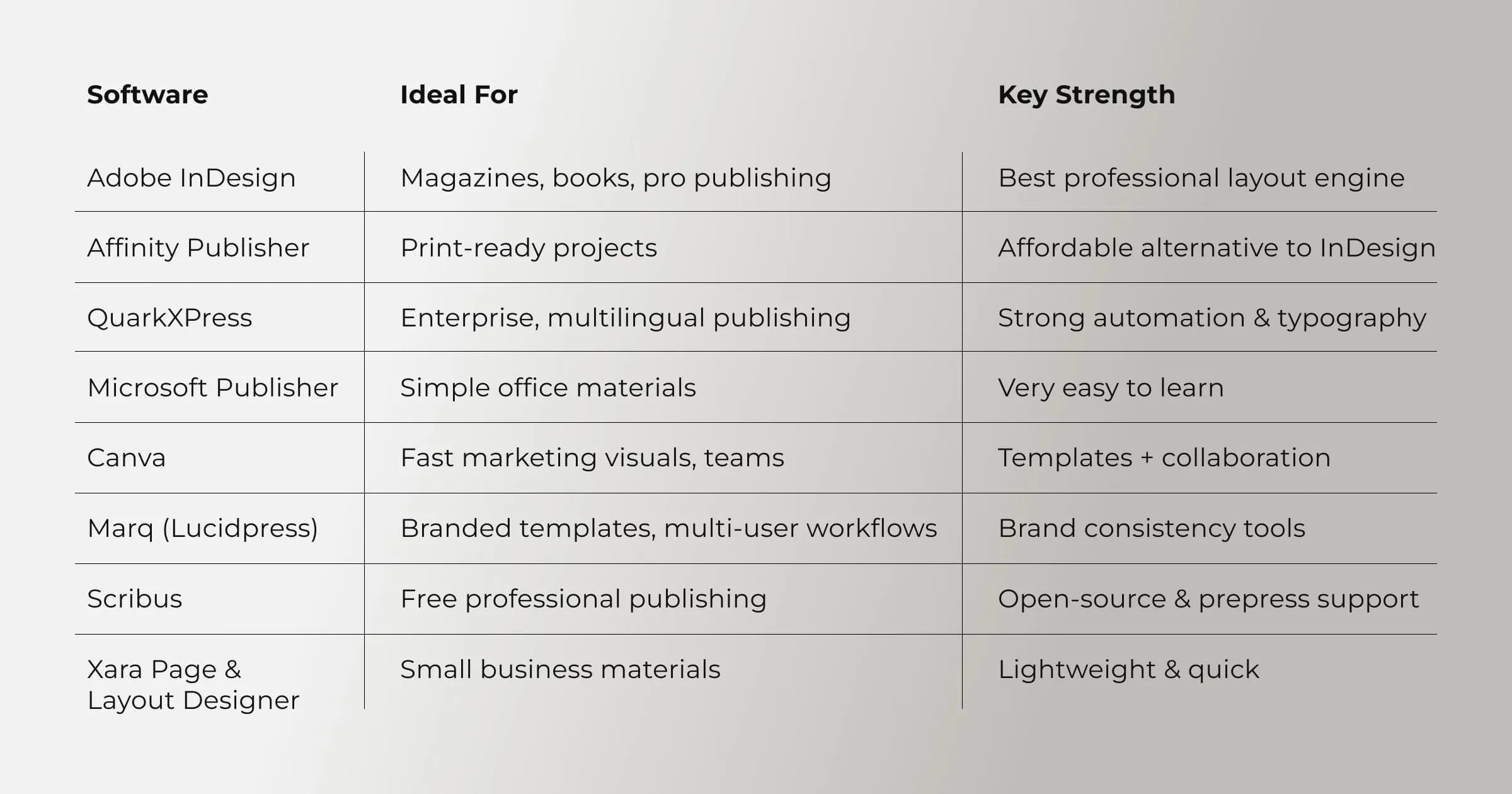
While the table summarizes the core differences, your ideal desktop publishing program should align with your actual workflow. If you're producing long-form documents or need precise typographic control, professional-grade software is essential. If speed, simplicity, and online collaboration matter more, lightweight cloud solutions may be the better fit.
This comparison block serves as a quick shortcut - the next section will help you evaluate software more strategically based on your goals, budget, and experience level.
How to Choose the Right Desktop Publishing Software in 2026
Choosing the best desktop publishing applications depends on your skills, project types, languages you work with, and your available budget. Below is a concise, practical guide to help you evaluate options clearly.
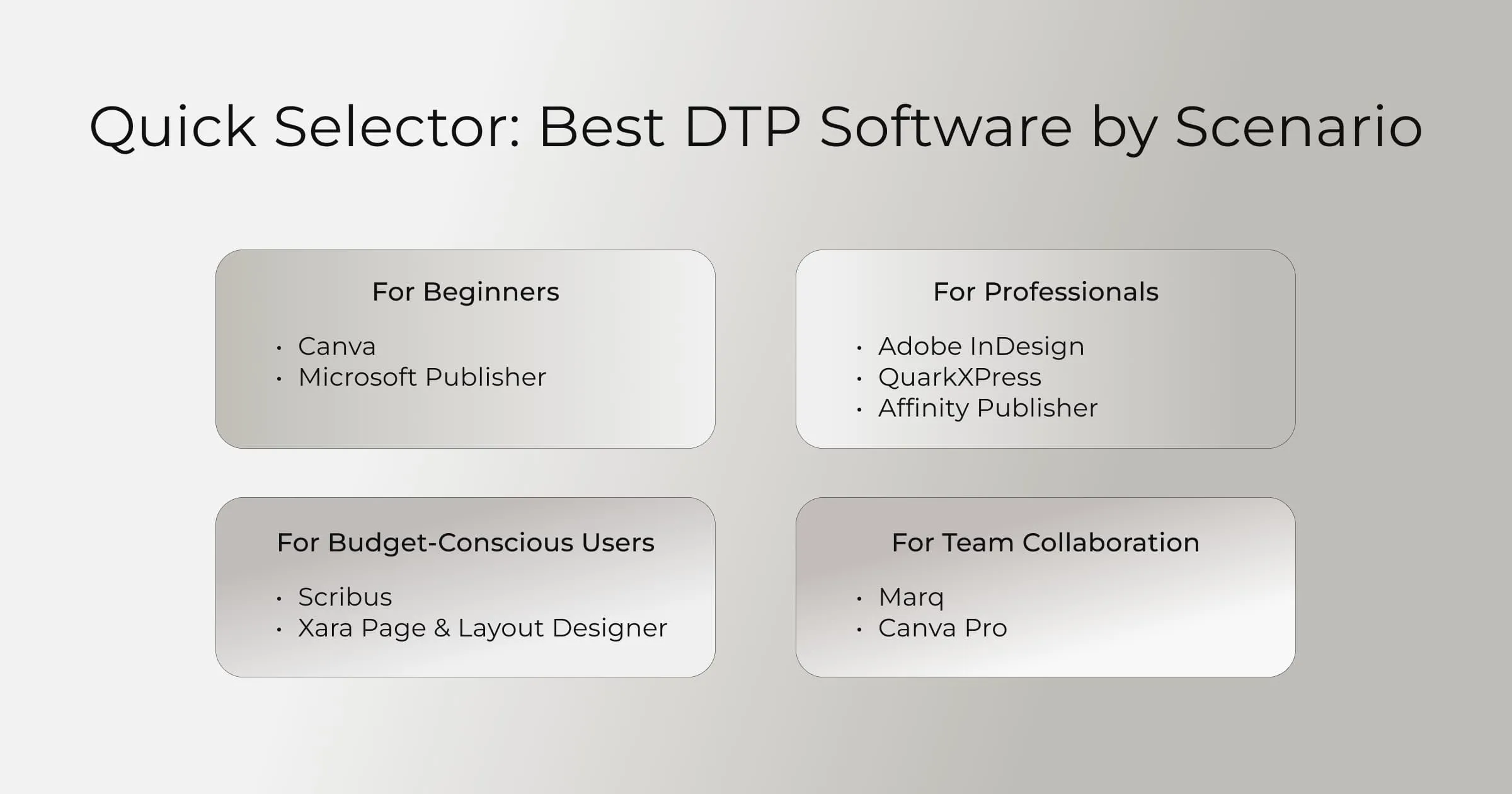
Based on Skill Level
Beginners typically prefer Canva or Microsoft Publisher because they offer templates and require minimal technical experience.
Professionals gravitate toward Adobe InDesign, Affinity Publisher, or QuarkXPress for their advanced layout engines and precise control.
For Various Project Types
Long-form documents such as books, annual reports, or print magazines require advanced page-making software like InDesign or QuarkXPress.
For quick marketing materials, social graphics, and lightweight brochures, Canva, Marq, and Xara deliver speed and simplicity.
For Multilingual Publishing
If you work with multiple languages - especially complex scripts - InDesign and QuarkXPress offer strong typographic engines, style controls, and precise text flow management.
Considering Your Budget
If you need a free tool, Scribus is the top option among dtp software lists. For a one-time cost, Affinity Publisher or Xara are excellent choices. Businesses with collaboration needs often choose Marq or InDesign for their enterprise features.
Alex Lozitsky
Co-founder and CEO