.png)

For more than two decades, WordPress has remained one of the most widely used content management systems in the world. In 2026, despite the rise of website builders, headless CMS solutions, and AI-first platforms, WordPress continues to dominate business websites and large-scale content marketing ecosystems.
The reason is not habit or legacy. WordPress has evolved. What once started as a blogging platform is now a flexible, enterprise-ready foundation for scalable content, SEO-driven growth, and complex digital ecosystems. When implemented correctly, WordPress in 2026 is not outdated - it is strategic infrastructure.
This article explores why WordPress still leads, which trends shape its future, and how businesses use it as a long-term platform for content scalability, performance, and sustainable growth.
WordPress in 2026: Why It Still Dominates
Why WordPress Hasn’t Disappeared
Over the years, many platforms have promised to replace WordPress. Some focused on simplicity, others on visual editors, and newer tools leaned heavily into AI-first experiences. Yet very few managed to deliver the same balance of flexibility, ownership, and scalability.
WordPress remains dominant because it gives businesses full control over their content, data, and infrastructure. Unlike closed platforms, it does not lock companies into rigid ecosystems or proprietary limitations. Businesses can adapt their tech stack, integrate custom solutions, and evolve their digital presence without rebuilding everything from scratch.
According to W3Techs, WordPress still powers over 43% of all websites globally - a strong indicator that it remains a trusted foundation for businesses of all sizes, including enterprise organizations.
Core Trends Shaping WordPress in 2026
AI-Powered WordPress
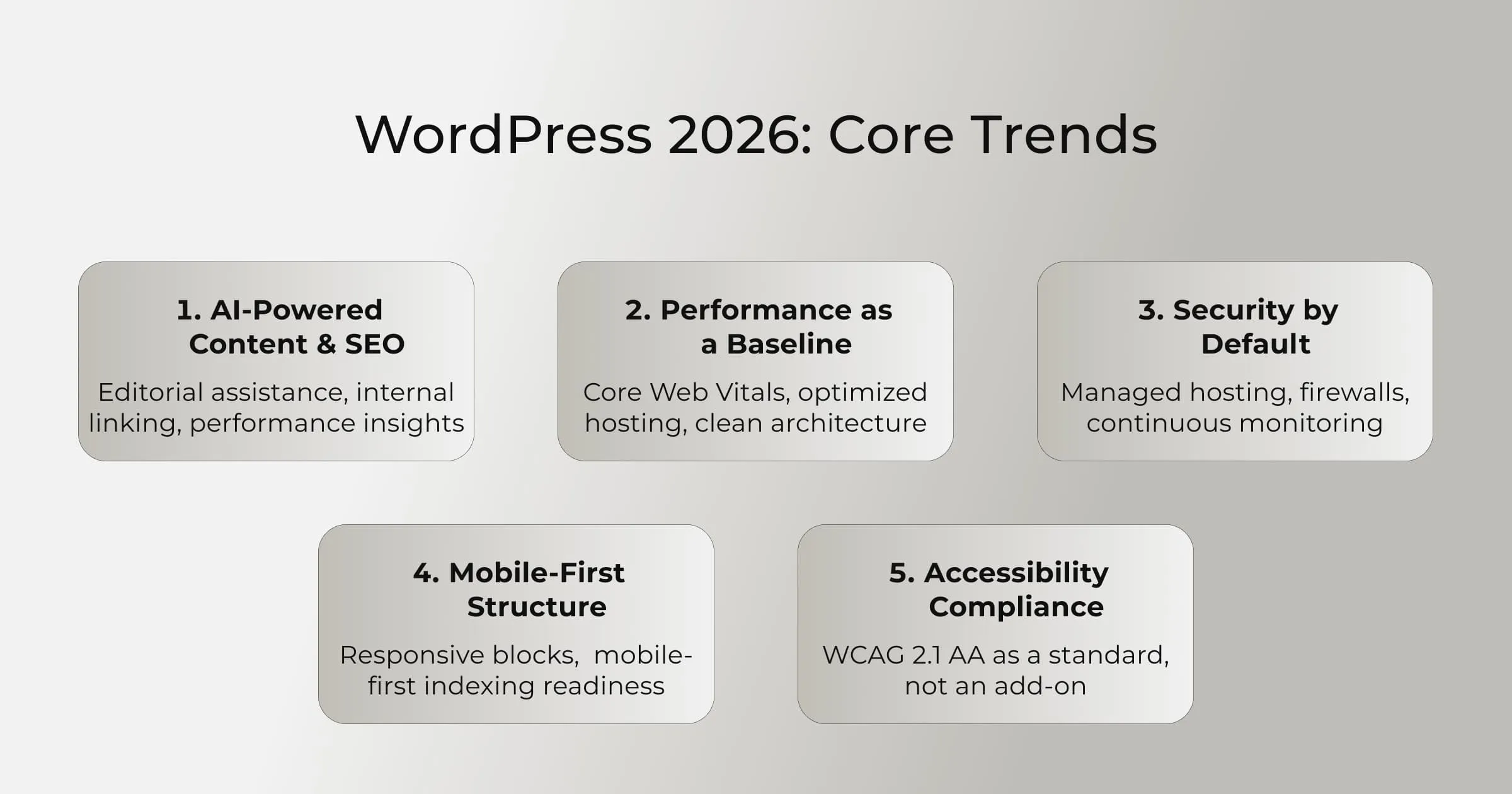
AI is no longer an experimental add-on. In 2026, WordPress AI plugins support content drafting, SEO optimization, internal linking, personalization, and editorial workflows. The real shift is not automation itself, but decision support.
Modern AI tools assist teams with metadata generation, headline optimization, content clustering, internal link suggestions, and performance insights. This allows content teams to scale output while maintaining quality and strategic consistency. Importantly, WordPress enables businesses to control how AI is used, rather than forcing AI-driven workflows by default.
This balance is why WordPress content marketing remains more sustainable than AI-first platforms: AI accelerates execution, while humans retain editorial judgment and brand voice.
Performance and Security by Default
In 2026, performance is no longer a competitive advantage - it is a baseline expectation. WordPress performance optimization now revolves around measurable outcomes such as Core Web Vitals, efficient rendering, and server-level optimization.
High-performing WordPress setups rely on modern hosting stacks, PHP 8.2+, object caching (Redis or Memcached), clean theme architecture, and optimized asset delivery. Targets such as LCP under 2.5 seconds and CLS below 0.1 are standard for business websites.
Security follows the same principle. Business-grade WordPress environments include managed hosting, firewall protection, automated updates, and continuous monitoring. When these fundamentals are in place, WordPress is as secure as any enterprise CMS.
Performance and security issues are almost always implementation problems - not platform limitations.
Mobile-First as a Standard, Not an Option
Mobile-first design is no longer optional. With mobile-first indexing firmly established, WordPress themes and block-based editors are designed for smaller screens from the start.
Responsive blocks, adaptive layouts, and performance-first rendering ensure that content remains accessible, fast, and conversion-friendly on mobile devices. This directly impacts SEO rankings, user engagement, and lead generation.
WordPress supports this shift natively, making mobile optimization a structural feature rather than an afterthought.
Accessibility as a Core Requirement
Accessibility is both a legal and business requirement in 2026. WordPress supports WCAG 2.1 AA compliance at the core level, enabling businesses to meet accessibility standards without excessive customization.
Accessible websites reduce legal risk, expand audience reach, and improve usability for all users. Businesses increasingly recognize accessibility as an ROI-positive investment, not just a compliance checkbox. WordPress accessibility plugins, semantic HTML, and block-level controls make inclusive design achievable at scale.
Is WordPress Outdated? Separating Fact From Fiction
Why People Think WordPress Is the Problem
When WordPress websites fail, the platform is often blamed. In reality, most issues stem from poor implementation rather than technical limitations.
Common causes include bloated themes, excessive plugins, weak architecture decisions, lack of performance optimization, and the absence of a long-term content strategy. Treating WordPress as a simple page builder inevitably exposes limitations. Treating it as a content management system removes them.
Can WordPress Support a Growing Business?
Yes - and this is where enterprise WordPress becomes relevant.
Large organizations use WordPress with headless or hybrid architectures, advanced editorial workflows, multilingual setups, and granular role management. With proper planning, WordPress scalability supports millions of users, extensive content libraries, and complex integrations without sacrificing performance.
Growth constraints are determined by architecture and strategy, not by the platform itself.
What Platform Reliability Looks Like for Business Websites
Reliability in 2026 means more than uptime. It includes predictable performance, content governance, security posture, and the ability to evolve continuously.
WordPress integrates seamlessly with CRM systems, analytics platforms, marketing automation tools, and custom APIs. This makes it an ideal foundation for long-term digital ecosystems built around content and data.
WordPress vs Other Website Platforms
WordPress vs Wix
Wix prioritizes ease of use and speed to launch. For small websites with minimal content needs, it can be sufficient. However, for content teams producing 50+ articles per month, Wix’s editorial workflows, SEO control, and scalability quickly become limiting.
WordPress offers deeper content management, granular SEO optimization, and long-term flexibility - making it more suitable for growing businesses.
WordPress vs Squarespace
Squarespace excels in visual consistency but restricts advanced customization. API access, complex content structures, and custom workflows are difficult to implement at scale.
WordPress provides architectural freedom, a larger developer ecosystem, and superior extensibility - key advantages for businesses with evolving requirements.
WordPress vs Shopify
Shopify is optimized for commerce-first experiences. WordPress, however, remains stronger for content-driven strategies, SEO authority building, and hybrid content + commerce ecosystems.
Many businesses successfully combine WordPress for content and Shopify for transactions, leveraging the strengths of both platforms rather than choosing one exclusively.

Alex Lozitsky
Co-founder and CEO
Pros and Cons of WordPress in 2026
WordPress Pros
- Full content and data ownership
- Advanced SEO and content management
- Flexible architecture for scalability
- Extensive ecosystem of tools and developers
WordPress Cons
- Requires professional technical setup
- Poor implementation leads to performance issues
- Ongoing maintenance is necessary
These trade-offs are manageable with the right strategy and partner.
Common WordPress Problems and Why Some Websites Fail
Reasons WordPress Sites Fail
Failures typically result from shortcuts: no performance strategy, plugin overload, ignored security practices, and treating WordPress as a static site instead of a dynamic system.
These are operational issues, not inherent platform flaws.
Security Concerns: Is WordPress Safe in 2026?
Yes - when built correctly.
Most attacks target vulnerable plugins or weak credentials rather than WordPress core. According to industry data, the majority of WordPress security incidents originate from third-party extensions. Strong hosting environments, regular audits, and proactive monitoring dramatically reduce risk.
Quarterly security audits and defined incident response plans are now standard for business-grade WordPress sites.
Secure Website Best Practices
Effective WordPress security includes managed hosting, Web Application Firewalls (WAF), two-factor authentication, proper file permissions, and real-time monitoring. Security is an ongoing process aligned with business continuity planning.
Why Some WordPress Sites Are Slow
What Slows WordPress Down
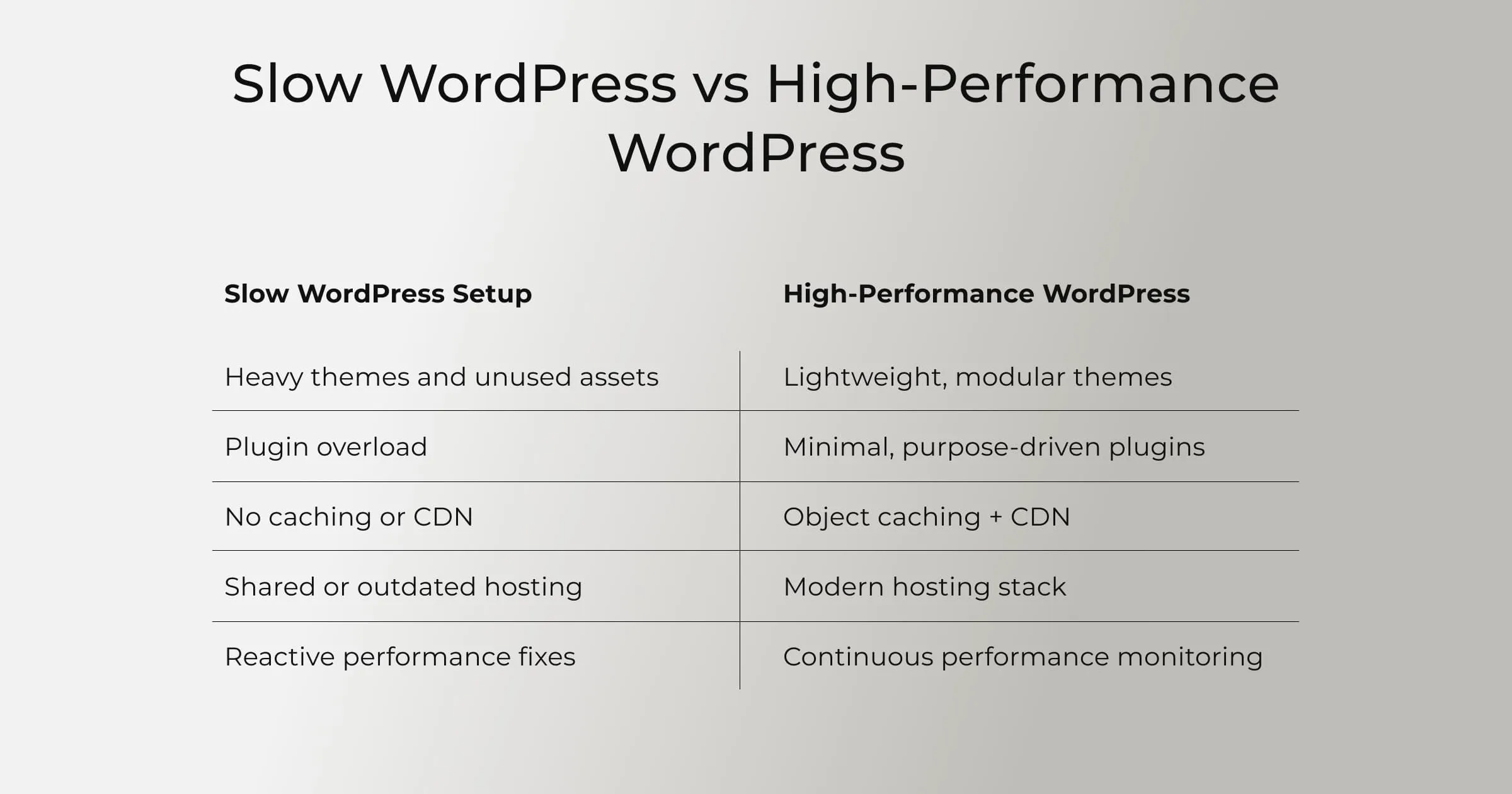
Heavy themes with excessive CSS and JavaScript can add hundreds of milliseconds to load times. Unoptimized images increase payload size by 3–5x. Third-party scripts often introduce 50–200ms delays each. Inefficient database queries and missing caching layers compound these issues as content grows.
What a High-Performance WordPress Website Includes
High-performance WordPress sites rely on optimized hosting, object caching, CDN delivery, critical CSS rendering, and continuous monitoring. This is where professional WordPress performance optimization makes a measurable difference.
SEO Capabilities: Where WordPress Still Dominates
What Makes WordPress SEO-Friendly?
WordPress provides unmatched control over URL structures, metadata, schema markup, internal linking, and content hierarchy - making WordPress content management one of the most SEO-effective systems for business websites. Combined with a strong editorial strategy, it remains one of the most SEO-effective platforms available.
Industry analysis from Search Engine Journal consistently shows that content-first CMS platforms outperform closed builders in organic visibility.
WordPress for Business Growth
WordPress is not just a website tool - it is a growth engine. Businesses use it to scale content through pillar–cluster strategies, distribute content across channels, implement AI-driven personalization, and build long-term authority through SEO.
We apply these principles in real client work, including scalable WordPress platforms and content-driven ecosystems showcased in our WordPress portfolio.
As your total match partner, Che IT Group designs WordPress solutions that align technology, content, and growth strategy into one scalable system.
Is WordPress the Right Long-Term Website Choice in 2026?
If your business depends on content, visibility, and adaptability - yes.
WordPress remains one of the few platforms that grows with strategy rather than limiting it. Its open architecture, scalability, and SEO strength make it a reliable long-term choice.
A Perspective That Comes From Experience
After years of building and scaling business websites, one pattern is clear: WordPress works best when treated as infrastructure, not a shortcut. With the right architecture and governance, it remains future-proof.
Build a WordPress Website That’s Designed to Scale
At Che IT Group, we design WordPress solutions focused on performance, scalability, and long-term content growth - not templates. If you’re planning a WordPress project in 2026, the difference lies in implementation, not the platform itself.
Alex Lozitsky
Co-founder and CEO