.png)


Did you know that during its rapid growth phase, Airbnb almost sank because of the customer chaos? The reason was fragmented workflows in its internal systems. They couldn't handle scaling customer operations and created onboarding/support bottlenecks. The solution that helped them, and which is now saving other businesses, is the transformation of internal systems into customer-facing platforms.
Why Internal Tools Often Evolve into Customer Portals
The transition from legacy systems to a dedicated B2B customer portal is always determined by the technological limits of the software you use. When you scale customer operations along with constant hiring of new employees, you face the problem of fragmented workflows. There, data gets stuck between internal systems and needs manual intervention. This creates operational bottlenecks and makes task completion dependent on people.
The transformation of an internal tool into a full-fledged customer operations platform requires architectural approach changes. This applies to monolithic admin panels with a tight connection between the database and the digital customer experience layer. They need to be redesigned with an API-first approach and with isolated access layers. It also makes sense to choose microservices instead of the tight connection with the main database. This enables real-time status updates for customers without overloading the ERP system.
What Is an Internal Tool and What Is a B2B Customer Portal?
The difference between an internal system and an external client product lies in the architectural approaches. Internal operations software is designed only for employees who need data density and transaction speed. This creates a high barrier to entry, as personnel training is managed by the company where they work.
An enterprise customer portal is built as an open customer collaboration ecosystem. So, developers must rely on a technical stack that can support a client-facing architecture. An external portal requires the implementation of advanced security protocols at the network edge and data isolation at the database level through a multi-tenancy model.
Both these software types can be categorized by their purpose:
Internal tools. They are focused on back-office productivity and can be divided into:
- Admin dashboards, with content moderation and/or user management capabilities (for example, Retool/Forest Admin);
- CRM panels for sales teams, where all deal history is stored (Salesforce or HubSpot are great examples);
- Inventory systems like Oracle NetSuite or custom modules in SAP;
- Reporting tools (like those in Tableau/Power BI), where analytics are used for management decision-making.
B2B customer portal software. Focused on customer retention, this software category can be divided into:
- Onboarding portals (e.g., GuideCX) that guide each individual customer through complex technical implementation milestones;
- Vendor portals (Coupa, Ariba, etc.), designed for centralized interaction with suppliers and automating procurement/document flow;
- Customer collaboration hubs, providing a secure environment for project collaboration (for example, SharePoint);
- Logistics/customer tracking portals (like Project44), which operate in real time and display shipment telemetry and document status.
Let’s take a closer look at internal tools and B2B portals.
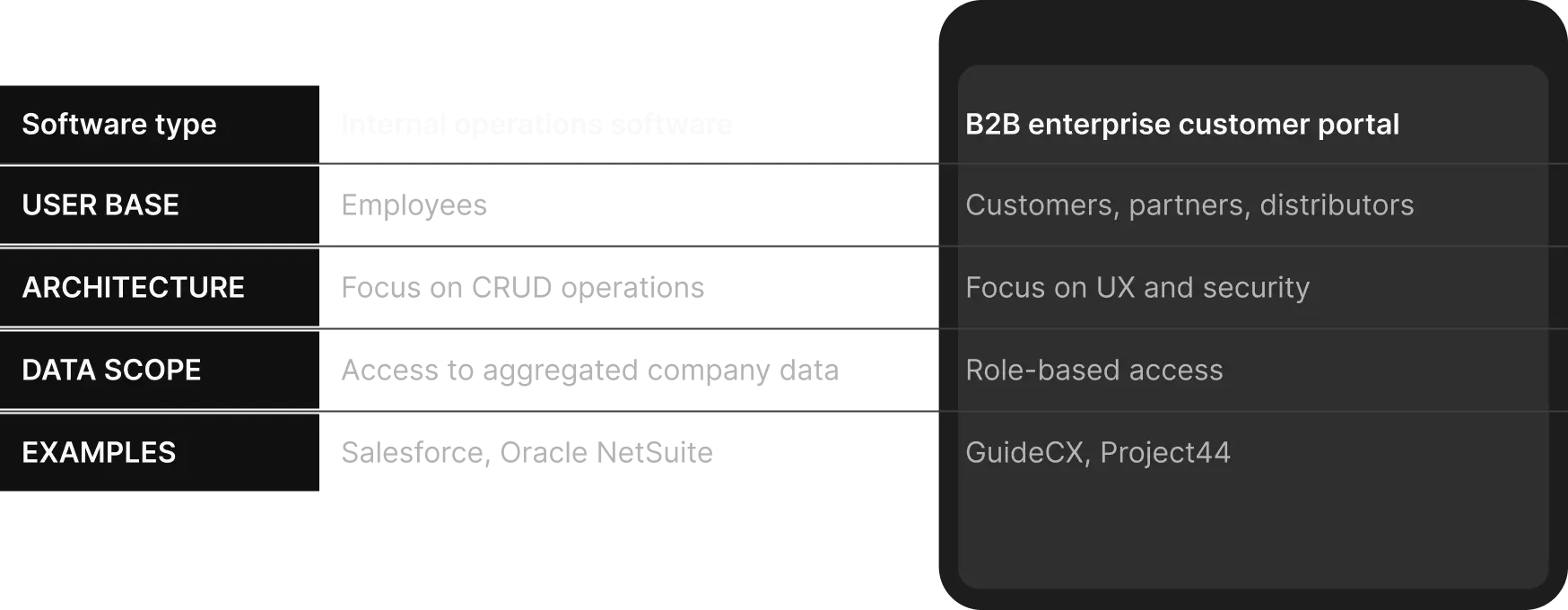
Now it’s time to see when to build a B2B portal. Here are the key signs your business has outgrown its internal software:
- Linear dependency, i.e., you cannot ensure scalable customer operations without new employees to support them;
- Increased workload on the support department, when more than 50% of tickets are routine status requests;
- Chaos in email onboarding, when important documentation and customer SLAs are occasionally lost in email chains;
- Request for self-service, when your B2B counterparties directly require a customer self-service portal to manage their data;
- Friction due to bloated fleet software, when customers are forced to switch between several internal utilities, which reduces their loyalty;
- The need for reporting visibility, when it's a compliance requirement from customers;
- Early adopters leave because onboarding is too complex.
If you checked more than three boxes, then the moment to build a customer self service portal has arrived.

Alex Lozitsky
Co-founder and CEO
How Customer Portals Improve B2B Customer Onboarding
Automated client onboarding is the primary tool for maximizing net revenue retention. If you introduce an onboarding portal, you’ll be able to ensure structured interactions across all stages and consolidate all communications at the six levels:
- Workflow centralization, where isolated systems already in use by the company are consolidated into a single source of truth;
- Customer onboarding automation, with client access immediately upon contract has been signed;
- Implementation tracking, with the ability to visualize all integration stages through interactive roadmaps;
- Document management, with versioning and e-signature support;
- Customer education, accompanied by contextual tooltips;
- Onboarding visibility, with real-time dashboards that display project progress for all responsible stakeholders.
Now let’s look at a B2B onboarding workflow for a fintech and logistics business:
- Stage one: Contract has been signed (the trigger is a webhook in the Portal API) – here, the portal automatically creates a user profile and a multi-tenant workspace to ensure role-based access via OAuth2;
- Stage two: Self-service document is uploaded and KYC/AML verification occurs;
- Stage three: Interactive integration and LMS milestone tracking begin (if an error occurs, the system generates automatic ticket to the internal CRM), and real-time telemetry streams;
- Stage four: Operations are launched (when the product reaches Go-Live status).
If you want more specific B2B customer onboarding best practices based on industry context, consider the following examples:
SaaS. This category includes platforms like HubSpot and Zendesk. They use built-in customer portals to allow new B2B clients to independently configure integrations and complete interactive tutorials.
Fintech. Stripe and Adyen are considered industry leaders here. They offer customized merchant portals that transform complex compliance and KYC checks into a step-by-step process.
Healthcare. Large medical software like Epic Systems and Cerner portals allow medical centers to centrally manage medical records and staff onboarding in a HIPAA-compliant manner.
Logistics. Giants like Flexport or myDHL+ give B2B customers visibility into the entire supply chain. They can independently manage customs documents and track shipments in real time.
Customer Portal Best Practices Companies Often Ignore
When you develop a scalable customer portal, you can mistakenly perceive it as a generic database without a specialized portal user experience. Such a mistake is very costly: if the interface is overloaded, corporate users will begin to sabotage the solution. That's why the development process requires the next customer portal best practices:
- Intuitive UX, based on consumer-grade design patterns for each B2B role;
- Role-based permissions, to define what information a specific user can/cannot see;
- Integrations and scalability, with company’s systems’ data orchestration;
- Compliance, analytics, and mobility, ensured through accessibility (here, we mean WCAG guidelines), the implementation of real-time dashboards, and compliance with generally accepted security requirements such as SOC2 Type II//ISO.
If you want to look at specific practices, we have a case involving an automated ranking and payment system.
A US client faced operational chaos because D2C brand representatives had no unified way to search and compare software. The portal itself needed to have a catalog of 500+ tools and had to be launched within weeks. To meet this, we deployed a no-code architecture with Webflow for the frontend, Airtable as a database, and Memberstack for premium content gating. We also set up end-to-end process automation based on Make scripts. As a result, the platform was launched in six weeks, and the client received 100% autonomous content management and zero operational overhead.
Another good example is the case of a freelance marketplace called The Starters. Manual rating calculations and onboarding through Stripe Connect began to limit scalability.
To solve this issue, we designed a dual automation architecture using Make (with Xano and Supabase) and implemented two scenarios. The first automatically calculates and updates freelancer ratings in real time. The second fully covers the Stripe Connect lifecycle. The project achieved 100% automation of ratings and payment onboarding, improved transparency for freelancers, and removed routine work for the client’s team.
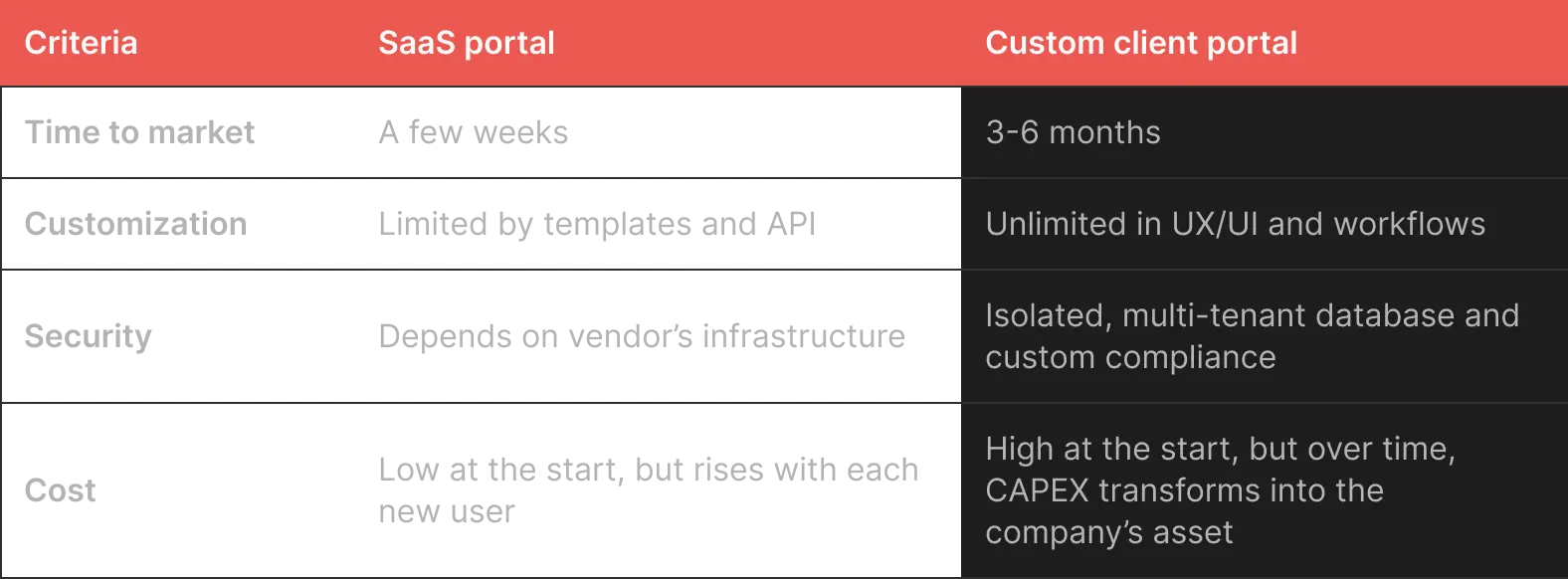
To summarize the insights above, here is a comparison table.
.webp)
Why Customer Success Teams Eventually Need Portal Infrastructure
Without a dedicated client IT infrastructure, B2B customer success teams get overwhelmed with issues. In contrast, centralized customer success operations automate routine work and reduce repetitive support tasks.
When a basic portal becomes a customer retention platform, every user action provides business insights, such as usage patterns. Support managers will be able to monitor customer health and act proactively before a customer leaves. Thanks to operational transparency, the portal will streamline customer adoption. This improves long-term engagement metrics and gives predictable upsell opportunities during contract renewals.
The Hidden Cost of Treating a Portal Like “Just Another Internal Tool”
The desire to save money with a customer portal based on internal tools leads to huge software technical debt. Internal software isn't designed for multi-tenant workloads. Scalability limits and security risks arise when customer data is not isolated at the database level. This leads to fragmented customer journeys, where data gets trapped between systems. So, sooner or later, the company will end up with complete infrastructure rebuilds.
Let's look at the experience of global leaders who have chosen this overhaul strategy.
Payment giant Stripe managed merchants through internal dashboards in its early days, but rapid growth forced the company to completely rewrite its data architecture. This is how Stripe Express was born. Incidentally, unicorn Flexport took a similar path: its rapid scaling led to the abandonment of basic automation systems in favor of a custom enterprise portal architecture. In the end, this was the only approach that solved portal scalability issues while keeping institutional clients.
Build vs Buy: SaaS Portal or Custom Platform?
To build a long-term customer portal strategy, you need to choose between a ready-made SaaS solution or invest in a custom customer portal. A SaaS solution is often sufficient for standard processes.
SaaS enterprise customer platforms also have some limitations. If you need flexible workflows, integration with legacy solutions, or standard compliance, you’ll need a custom solution. You also have limited control of the UX because you cannot access the platform architecture. In addition, any technical failures on the vendor’s part will damage your reputation. So, to achieve autonomy and scalability, it's best to consider custom development from the start.
And for agencies that want to provide customer platforms as a product without building a larger in-house team, a white label development model can be a practical option.
What a Modern B2B Customer Portal Architecture Looks Like
When developing a scalable portal platform, we use a headless architecture and microservices, when the client interface is isolated from critical internal systems. Other key features of this type of customer portal architecture include:
- Modularity: Microservices separate the frontend and back-office, which, in turn, enables UI updates without disrupting the main databases;
- Secure orchestration APIs: A layer of secure APIs that collects/structures/caches data from internal systems in real time;
- Identity systems and RBAC: Authentication protocols combined with a role-based access model that limits access to data by department;
- Workflow automation engine: This ensures background process orchestration and task generation;
- Analytics and cloud scalability: They autoscale an enterprise portal infrastructure during peak loads;
- AI-enhanced customer operations: This refers to AI agents for ticket auto-classification, knowledgebase search, and onboarding personalization.
Final Thoughts
Today, many companies build customer portals that look like regular internal tools. The reason is simple: successful customer onboarding and support now rely on clear operations and easy self-service.
A scalable portal is no longer just an internal need; it gives a real edge. If you want to make the transition, reach out to us. We help businesses make this shift smoothly and turn scattered internal systems into modern, scalable platforms.
Alex Lozitsky
Co-founder and CEO