.png)

.webp)
Is your team spending more time jumping between different service windows than actually getting their main work done? This annoying problem can be solved. The key is knowing how to fix it and what benefits it will bring to your business.
We went through this ourselves and found that each specialist was losing over 15 hours a week just syncing data across seven platforms. All the switching led to fatigue, mistakes, and onboarding problems that hurt our profits. By bringing everything together in one user portal, we cut onboarding time and saved hundreds of hours.
The Hidden Cost of Too Many Internal Tools
As organizations grow their IT infrastructure, they often end up with a software tool sprawl, and lose track of why certain services were added. But what if the functionality is already available in other systems you use, while your employees have to spend time onboarding it? Or if it exists independently of the entire infrastructure of other disconnected business systems, and data has to be manually moved between them? This wastes time and money. The result of such an approach is departments working in their own information bubbles, and employees get tired from constantly switching between different systems.
Operational inefficiency is never obvious. Reduced employee productivity due to fragmented workflows becomes visible gradually. It turns out to be painful for the business only when it leads to excessively high costs for subsequent scaling. Approvals that are performed simultaneously in Slack, Gmail, and Excel inevitably lead to errors and version control loss. When CRM records are fragmented and reports are inconsistent, top managers cannot make decisions based on reliable data.
When business systems do not work well together, it is impossible to automate processes from start to finish. Without proper software consolidation, attempts to implement new tools only increase confusion. As a result, teams spend hours manually syncing information instead of focusing on their main products or services.

We used to start our day by checking seven different services. Jira handled our tasks, while Slack and email split our communications. Our CRM was separate, and for reporting, we copied data into Excel. Each step risked mistakes, and we could lose up to 15 hours a week just syncing everything. When we switched to a custom portal, we reworked our processes. Now, when a manager opens a project, the portal automatically sets up communication threads, creates a document structure, and pulls the latest financial data from the database.
As a result, we reduced project onboarding time by four times, and the amount of unaccounted data dropped to zero. The real advantage isn’t just in the features, but in having a management system that matches specific processes, without the need to adapt to existing SaaS tools.
The Moment Companies Realize Their SaaS Stack Stops Scaling
Sooner or later, every company reaches a point where managing integrations becomes overwhelming. This often happens because SaaS licensing costs rise, it gets harder to meet security standards, and it becomes difficult to keep data and processes transparent across departments.
Have you run into any of these issues? These are clear signs that your current setup no longer meets your business needs. So what are your options? Should you keep patching together services that don’t work well together, consider replacing SaaS tools, or invest in a custom solution?
Buying more subscriptions, often called SaaS sprawl, usually leads to problems because too many integrations can make your IT setup unstable. This means software consolidation becomes a necessity. Indeed, only a centralized platform allows for the implementation of AI and automated scenarios across all business processes. But how can you tell if it’s time to consider enterprise software consolidation? Check the list below – if at least three points apply to you, it might be time to move to a single internal operations platform:
- Your teams have to copy data by hand from one system to another;
- Your employees spend hours or even days preparing regular reports;
- Your main business processes depend only on spreadsheets;
- Most of your employees have to switch between 5-10 systems every day;
- Access rights management has become a complex administrative task due to the lack of centralization;
- The onboarding process for each new employee requires setting up specific access rights for several different services;
- Your management team does not have a single view to monitor how your business is doing.
A solid process consolidation strategy can help you build a new management culture that relies on clear data. By doing this, you can automate routine tasks that slow your team down and set up systems that support your company’s growth. When you invest in these upgrades, think about the hours you’ll save by reducing workflow fragmentation.
A Forbes article points out that when companies grow quickly, teams with scattered workflows lose productivity and employees start to burn out.

Alex Lozitsky
Co-founder and CEO
What Changed After Moving to One Unified Portal
Business process centralization involves more than just using a standard interface. By connecting different systems, you remove silos and create a single source of truth. Unified workflows make it easier to manage every process, from onboarding to generating reports.
Now, let's explore which industries benefit most from workflow automation portals.
SaaS
When engineers and sales teams use the same system, customer data stays consistent and up to date.
Healthcare
With a shared dashboard for patient data, doctors and administrators can follow security protocols more easily and make faster decisions.
Fintech
Adding automated approvals for transactions in your portal helps lower compliance risks and speeds up customer service.
Logistics
Real-time document management across departments helps prevent costly delays from data reconciliation between warehouses and transportation teams.
Manufacturing
Unified access to analytics makes it easier for production lines and procurement teams to work together.
Although these industries face different challenges, they share one thing in common: unstructured data processing.
To show how this works in practice, we’ll share our experience building an AI co-pilot for government tenders. A client asked us to create a service that would bring together scattered documents in one place. We developed a platform that automatically reviews requirements, checks for standard compliance, and spots risks. This reduced the analysis time from four hours to just a few minutes. As a result, the client was able to triple the number of tenders and achieve 100% accuracy in compliance checks.
In another example, we built a scalable Webflow membership platform for a D2C marketplace to show how bringing tools together can solve backend problems. We combined Webflow, Airtable, Memberstack, and Make into one content management system. This removed the need for a setup that used to take weeks of manual vendor tracking. The new system automated all administrative tasks (from handling subscriptions to managing content moderation). This enabled the client to catalog over 500 tools and launch the entire ecosystem in just six weeks with zero operational costs.
.webp)
We recently moved a B2B engagement platform from Zapier to n8n, which made the operations much more efficient. The client had over 300 duplicate Zapier workflows that were overwhelming their system. We replaced them with a single n8n orchestration engine to automate response classification. This change cut monthly infrastructure costs by 90% and reduced the time needed to connect new clients from 1.5 hours to just 7 minutes.
Here’s an example of how we improved new employee onboarding by centralizing the workflow.
The old process looked like this: HR managers had to manually create a profile in the HR system, send separate emails to the IT and accounting departments for approvals, and track each step using different messaging apps. This caused approval delays and extra administrative work.
The new workflow automation portal changed everything. HR now runs the entire process within a single workflow automation portal. The system assigns tasks to each department and sends instant notifications to managers for approval.
As a result, business process centralization reduced onboarding time by 60%, removed manual data entry, and eliminated bottlenecks in the approval process. Management now has better operational visibility and a clear view of team readiness. The unified workflows also make sure data access is secure and based on roles.
Why Successful Portal Consolidation Is More About Operations Than Technology
Many companies think portal consolidation is a tech task of building and launching software. In reality, success comes from strong operational design. Simply migrating existing processes to a centralized shell will still keep them inefficient.
This is why you should start with process mapping and find any duplicate operations. First, you simplify workflows (some of them have to be completely redesigned), and only after this step you will be able to proceed with digital transformation operations. The table below shows different ways to approach consolidation.
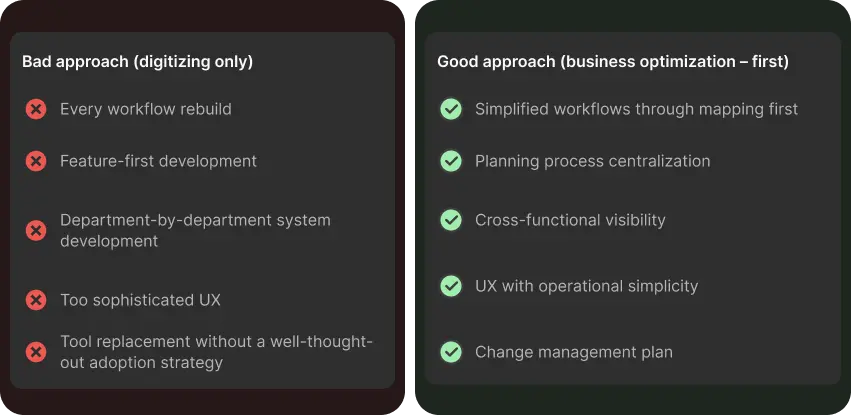
The way you introduce the portal is just as important as how it works. To make it successful, you will need workflow redesign for your employees and a plan for change. Staying organized and open to new ways of working will help you go through a smooth operational modernization and improve key performance indicators without causing long-term disruptions.
Architecture Decisions Behind a Unified Internal Platform
To build a unified internal platform, it’s best to move away from monolithic systems and use a modular architecture. Monolithic setups that combine different SaaS tools often become hard to update and costly to maintain. In contrast, modular architecture keeps each process separate, making it easier to add new integrations through APIs. It’s also important to set up single sign-on and role-based access control. When designing, remember to plan for cloud scalability and keep detailed audit logs. Here’s what a typical scalable internal platform includes:
- An internal admin layer with a user interface for managing users and system settings.
- A workflow engine that coordinates automated processes and assigns tasks to the right people or modules.
- A reporting module that gathers real-time data from all modules.
- An integration layer that securely connects with external services through APIs.
- An AI automation layer for adding AI agents.
This enterprise portal architecture scales better because each problem stays contained. This means that updating one module won't affect the core of your workflow automation platform or access settings. This setup helps avoid the accumulation of architectural debt and makes it possible to implement AI-enabled operations (usually within a secure environment) using company data.
Final Thoughts
Using different SaaS tools might seem easier and cheaper, but this approach can bring business challenges in the long term. By switching to a unified platform, you can grow your operations more easily and automate your processes, especially with AI-powered solutions.
If you need help bringing all your tools and data together, reach out to us. We can help you build a new portal or bring your separate business processes into one system.
Alex Lozitsky
Co-founder and CEO