.png)

.webp)
Skip lengthy development cycles: your product idea can go from a few sentences to a working prototype in a single afternoon.
That’s the appeal of vibe coding. You describe what you want in plain language, and an AI tool generates the code. You test the result, ask for changes, and repeat until you have something you can show potential customers.
Andrej Karpathy, former Tesla AI director and OpenAI co-founder, popularized the term in early 2025.
In his original post, he described a way of coding that lets AI handle most of the code while the developer focuses on the result.
For founders, vibe coding lets you test an idea before spending weeks or months building it. But a prototype that works in a demo may still have problems when real users start using it, sharing sensitive data, or putting more load on the system.
So, how much time can vibe coding save? Where can things go wrong, and what needs to happen before an AI-built prototype is ready for real users?
What Is Vibe Coding, Exactly?
Vibe coding means building software by talking with an AI coding tool. You explain a feature, check what the AI creates, and use more prompts to adjust how it works or looks.
For example, you could ask an AI tool to make a booking dashboard with a calendar, customer records, and appointment statuses. The tool can build the interface, write the code, and connect some of the needed features. You then test it and ask for changes, such as adding a search bar or letting users to reschedule appointments.
This approach is called prompt-based development: you focus on what the product should do instead of writing every function yourself.
The main difference between vibe coding and regular AI-assisted coding is how much control the developer keeps over the code.
With AI-assisted coding, a developer might use an AI coding assistant to suggest a function, explain an error, or generate a unit test. The developer still makes the main technical decisions and reviews the changes.
With vibe coding, the person building the product can let AI handle bigger tasks without checking every line of code. Some tools can plan tasks, edit several files, run commands, and fix errors with minimal oversight.
.webp)
From Idea to Product: The Traditional Timeline
Traditional MVP development usually follows these steps, though some can happen at the same time.
- Discovery: Decide what problem to solve, who the users are, which features to build first, and what assumptions to test.
- Design: Plan how users will move through the product, sketch the main screens, and design the interface.
- Development: Build the parts users see, the code that runs behind the scenes, the database, and connections to other services.
- Testing: Check that everything works and fix bugs.
- Launch: Set up hosting, backups, access permissions, monitoring, and everything else needed to run the product.
Where does the time go? Developers have to understand what’s needed, set up the project, build reusable parts, connect services, handle errors, and test different situations. Teams also spend time talking through requirements and making decisions as they go.
The Vibe Coding Timeline: Hours Instead of Months
Vibe coding speeds up the early stages of development. A founder can describe an idea, get an initial interface, and test the main user flow before a traditional project even finishes its design phase.
This can make a big difference in how fast you build an MVP, especially if the product has a simple goal.
The following comparison uses a hypothetical appointment-booking MVP with a customer-facing interface, a calendar, and basic booking management.
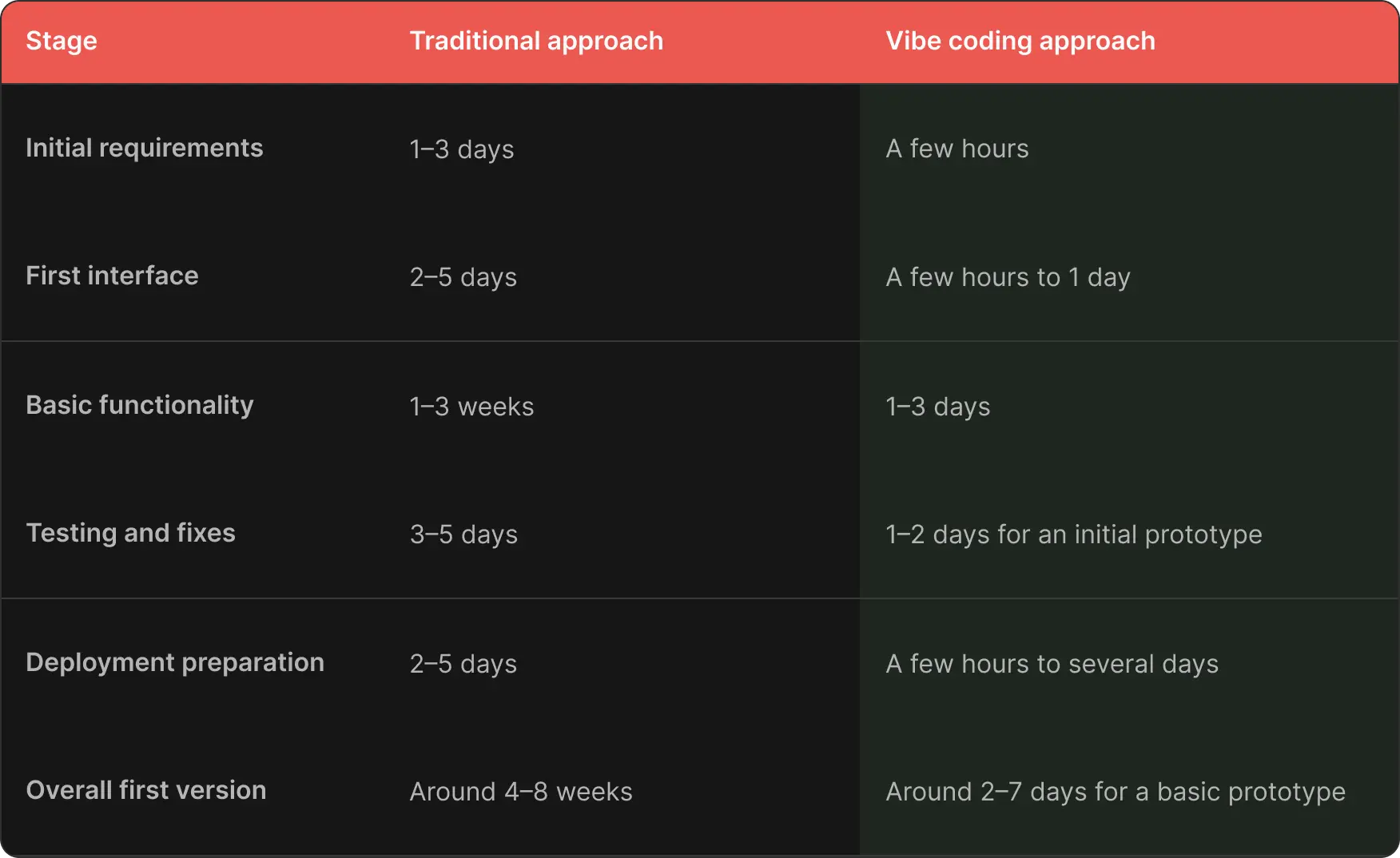
These are just example estimates, and they assume a small, well-defined app, an available AI tool, and someone who can make basic product choices.
This comparison also has limits: the vibe coding timeline is for a basic prototype, not a finished product. Security checks, more testing, architecture, and setup can take much longer.
What Gets Automated
Vibe coding can speed up a few areas of development:
- Initial interfaces: Create forms, dashboards, navigation, and common page layouts from a description.
- Boilerplate code: Write common components, basic data models, and repetitive functions.
- Early changes: Update labels, layouts, and user flows by describing the changes you want.
- Basic tests and documentation: Draft tests, explain how functions work, and write code documentation.
- Connections to other services: Generate code to connect APIs and third-party tools, which still need proper setup and testing.
These benefits make rapid prototyping helpful when you need quick answers to business questions. AI tools let you test these ideas before you invest in a bigger development project.
Real-World Example of Speed Gains
Let’s imagine a founder who wants to test a portal where customers submit service requests and track their status.
A traditional team might spend several weeks defining the workflow, designing the interface, building the core functions, and testing the first version.
With vibe coding, the founder could generate a clickable interface and a basic working flow in a day. They could show it to five or ten prospective users, watch where they struggle, and revise the product before spending more money.
This is the practical difference in vibe coding vs traditional development: the first approach can shorten the path to an initial experiment, while the second delivers a structured process for building and maintaining software. By the way, teams can also combine the two approaches.

Alex Lozitsky
Co-founder and CEO
The Trade-Offs Nobody Talks About
Just because code is generated faster doesn’t mean the whole product will be done sooner.
The 2025 Stack Overflow Developer Survey found that 84% of respondents used or planned to use AI tools in development. Yet 46% said they distrusted the accuracy of AI output, compared with 33% who trusted it. The survey also found that 45% had spent extra time debugging AI-generated code.
These data don't prove that particular vibe coding produces poor software, but they show why you should treat generated code as work that needs verification.
Vibe Coding Technical Debt You Can't See
Technical debt builds up when shortcuts make future changes harder or more expensive. Vibe coding can introduce it when AI generates code to solve each new request without a clear plan for how the parts should work together.
This is what’s called vibe coding technical debt: code that works now but is hard to understand, change, or maintain later.
Security Blind Spots
Vibe coding security risks can be difficult to spot during a demo because many vulnerabilities appear only under specific conditions.
For example, an AI-generated admin dashboard might hide its admin button from ordinary users but fail to check permissions on the server. A user could then attempt to access restricted data directly through an API request.
Other AI code generation risks include SQL injection, exposed API keys, weak session handling, unsafe file uploads, and missing input validation.
Architecture That Doesn't Scale
An AI tool may choose a convenient structure for the next feature without considering how the product will evolve. Business rules can end up duplicated across pages, database access can become scattered, and external services can become tightly connected to the interface.
For example, an online store might start with a simple product list. Later, the owner adds several warehouses, different prices for different customers, and automatic stock updates from an ERP system. If the original code only supports one price and one stock value per product, developers may need to rewrite large parts of the app to support these changes.
The Illusion of a Working Demo
A prototype usually shows the ideal scenario: a user enters the right information, everything works, and the app shows the expected result.
However, a real product also needs to handle errors, repeated requests, expired sessions, invalid data, service outages, and attempts to access information without permission.
Skill Erosion and Vendor Lock-In
Another risk is relying on AI for every technical decision: people may struggle to diagnose problems when the tool gets stuck or produces contradictory fixes.
Vendor lock-in can also show up if your product depends heavily on one proprietary platform, its hosting environment, or its specific AI workflow. So when you decide to move the application elsewhere, it may require rewriting functions, changing data models, or rebuilding connections to external services.
When Vibe Coding Makes Sense, and When It Doesn't
Vibe coding for startups can be a sensible choice when testing an idea matters more than building a complete system from day one.
It works particularly well for:
- MVPs: Test the core value proposition before investing in full development.
- Prototypes: Show customers, investors, or your team how it works.
- Internal tools: Create a simple dashboard or reporting interface for a small team.
- Early experiments: Test a feature or business assumption that may be discarded.
- Learning: Help non-technical founders understand how a product might work.
A good rule of thumb is to think about what could go wrong if the app fails. The more serious the risks, the less you should trust unreviewed generated code.
If you are comparing vibe coding vs. traditional development, consider the following questions:
- Can you describe the first version in a few clear user flows?
- Can you test the idea without real customer data or live transactions?
- Is it acceptable to replace parts of the prototype later?
- Can someone with the right technical skills review the code before release?
If most answers are yes, vibe coding may be a good starting point. If the application needs complex permissions, sensitive data handling, strict uptime, or intricate business rules, involve an experienced developer early.
To build an MVP in a structured way, start by defining the smallest version that tests your business ideas. Then, decide which parts need to be built to production standards right away.
How to Use Vibe Coding Without Getting Burned
To build a reliable product, you just need a clear plan to check the results before customers rely on it. Use this checklist when moving from a prototype toward production.
Review the code and its structure.
Have a developer review the main parts, database queries, authentication, permissions, and connections to other services.
Test more than the happy path.
Test invalid inputs, expired sessions, duplicate requests, failed payments, and interrupted API calls, if applicable.
Check security and data handling.
Check access permissions, how secrets are stored, input validation, database access, and error messages. Remove test credentials and fake data before launch.
Prepare the production environment.
Set up version control, keep development and production separate, back up your database, monitor for errors, and have a recovery plan.
Review the architecture before adding more features.
Map out the main parts and how data moves through the app. Find out where business rules are and how the app connects to other services.
Check who owns what.
Make sure you have access to the source code, database, domain, and all key accounts. Also check the terms of the external tools you use.
Decide what to keep and what to rebuild.
Some AI-generated code may work well after a review, but other parts may need major changes or a complete rewrite. An experienced development team can help you decide what to keep and what needs more work. At Che IT Group, we build custom web solutions and AI-powered workflows, including AI automation.
The same applies to products that outgrow a low-code platform. Our guide to moving off low-code without rebuilding everything explains how to make the switch step by step.
Speed Is Not the Whole Story
Vibe coding lets founders test ideas fast before spending a lot on development. Remember that the first working version is just the beginning of product development, not the end.
If you’ve already built an MVP with vibe coding, don’t guess if it’s ready for production. Get a technical audit that can spot security problems, code that needs changes, and missing tests or architecture. Then you can decide what to fix, what to keep, and what to build next.
Alex Lozitsky
Co-founder and CEO