.png)
.avif)

A CRM decision often starts with a simple question: how much does the software cost per user?
That number can be useful for comparing products, but it’s a poor basis for comparing ownership. Your real CRM bill can include licenses, paid features, system connections, configuration, custom code, administration, data work, training, and ongoing development.
This is why Salesforce total cost of ownership needs a wider calculation than the subscription invoice.
Why "License Price" Is the Wrong Number to Compare
Salesforce currently lists Sales Cloud at $25 per user per month for Starter, $100 for Pro, $175 for Enterprise, and $350 for Unlimited. Agentforce 1 Sales is listed at $550 per user per month. Salesforce notes that some capabilities, including AI features and certain advanced tools, can require separate purchases.
That makes Salesforce pricing tiers easy to understand at first glance. The problem starts when your requirements move beyond the basic package.
A 20-person sales team on Enterprise at the published $175 rate represents $42,000 per year before additional products, paid features, consulting, custom work, or other costs.
Add 20 more users and the recurring license cost doubles.
This is the central characteristic of a per-seat CRM cost model. Your software bill follows headcount, even when the underlying CRM process has not become twice as complex.
Teams can also start on a lower tier and move up when they need API access, advanced automation, forecasting, reporting, AI features, or other capabilities. Salesforce's current pricing tables show several features marked as available for purchase on Enterprise and other editions.
A custom CRM has no per-seat subscription in the same sense. Adding the 51st user does not automatically create another software license charge.
That does not make custom software free to scale. Hosting, support, security, and development still cost money.
The Real Cost Breakdown of Salesforce
The visible Salesforce subscription is only one line in the budget.
Salesforce also has a large ecosystem of paid products and third-party applications. Its AppExchange currently lists thousands of applications and consultants, with paid products ranging from document signing to data tools and system connectors.
For example, Salesforce's current Sales Cloud pricing shows Data Cloud, Tableau Next, Sales Planning, Agentforce, and other capabilities as available for purchase at certain tiers.
The resulting Salesforce hidden costs depend heavily on what your business actually needs. The table below breaks down the main cost categories and what you may pay for each.
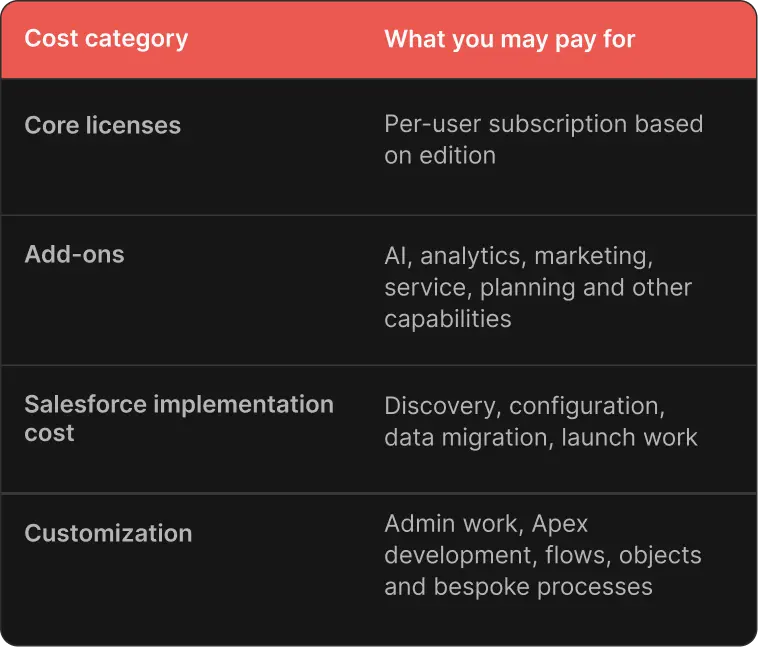
Salesforce itself documents several methods for exporting customer data, including Data Loader and third-party ETL tools. That matters when you calculate long-term ownership because your data sits inside a platform with its own data structures and processes.
The biggest mistake is to treat Salesforce implementation cost as a one-time project cost and forget about it after launch.
Your CRM keeps changing, new sales processes appear, and each change creates work for your team.
The Real Cost Breakdown of a Custom CRM
In the case of custom CRM development, the largest expense usually appears at the beginning. You pay for discovery, architecture, UX, development, testing, deployment, and the first production release.
After that, your cost depends on how much software you need to maintain and how quickly your business wants to change it. The table below breaks down the main cost categories for a custom CRM and what each may include.
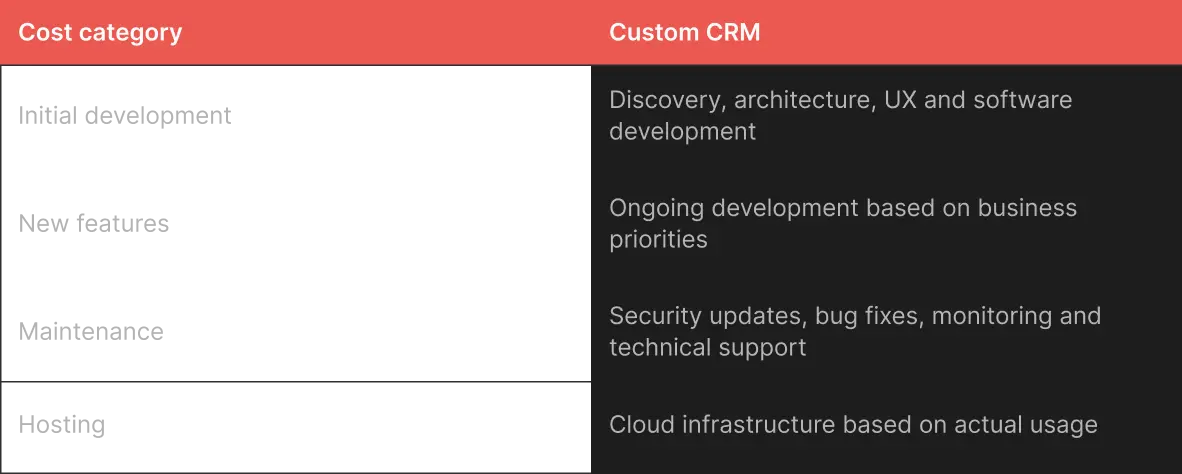
The economic trade-off is simple: you exchange a recurring license model for ownership of the software.
That means custom CRM maintenance does not disappear after launch. You still need technical ownership: someone needs to manage updates, monitor the application, handle security issues, and build new functionality.
The upside of having custom CRM is control, because you decide what gets built, when it gets built, and how the system connects to the rest of your business.
For companies already operating custom software, this can be particularly attractive. A CRM can become another part of the existing technical platform instead of another subscription sitting beside it.
Our Rocken project shows one version of this model. The product started with an initial scope and grew as operational requirements became clearer. That type of evolution is easier to plan when the software itself belongs to the business.

Alex Lozitsky
Co-founder and CEO
Side-by-Side: 3-Year and 5-Year TCO Scenarios
Let's use an example, and assume a company starts with 30 CRM users and grows to 50 over five years. For Salesforce, we'll use the current published Sales Cloud Enterprise list price of $175 per user per month. We will not assume discounts, taxes, contract-specific pricing, or paid add-ons.
For custom CRM, let’s assume:
- $180,000 initial development
- $35,000 annual maintenance and further development
- $12,000 annual hosting and infrastructure
- No per-user software charge
- No major additional product modules
These custom figures are illustrative orientation figures, not market quotes.
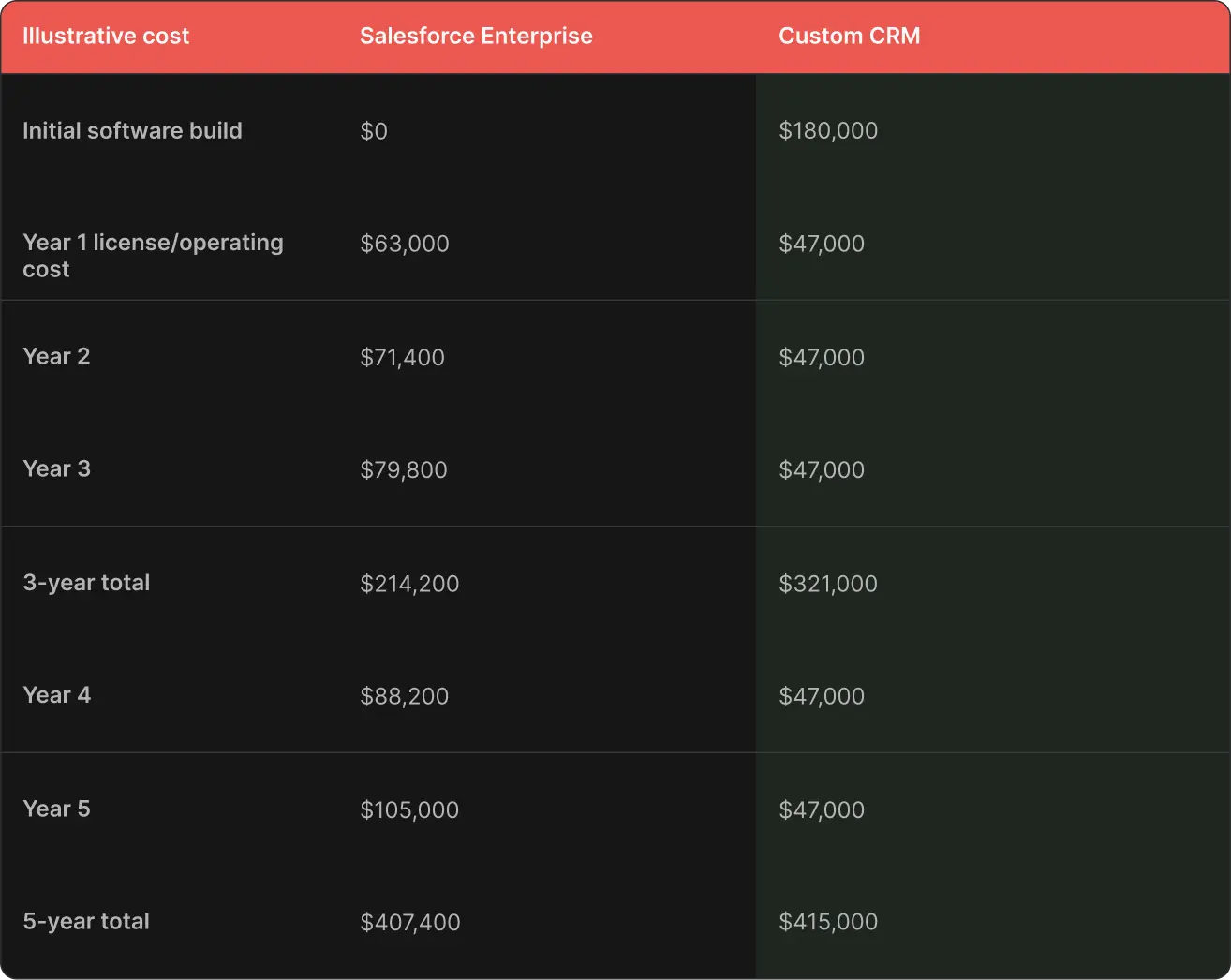
The Salesforce numbers assume user growth from 30 to 50 seats and no additional products or services. The custom CRM numbers assume a $47,000 annual operating cost after launch.
In this particular scenario, Salesforce is cheaper over three years and roughly comparable over five. That is exactly why a serious CRM cost comparison cannot start with "custom is cheaper."
If change the assumptions, the result changes too: suppose the company reaches 100 users instead.
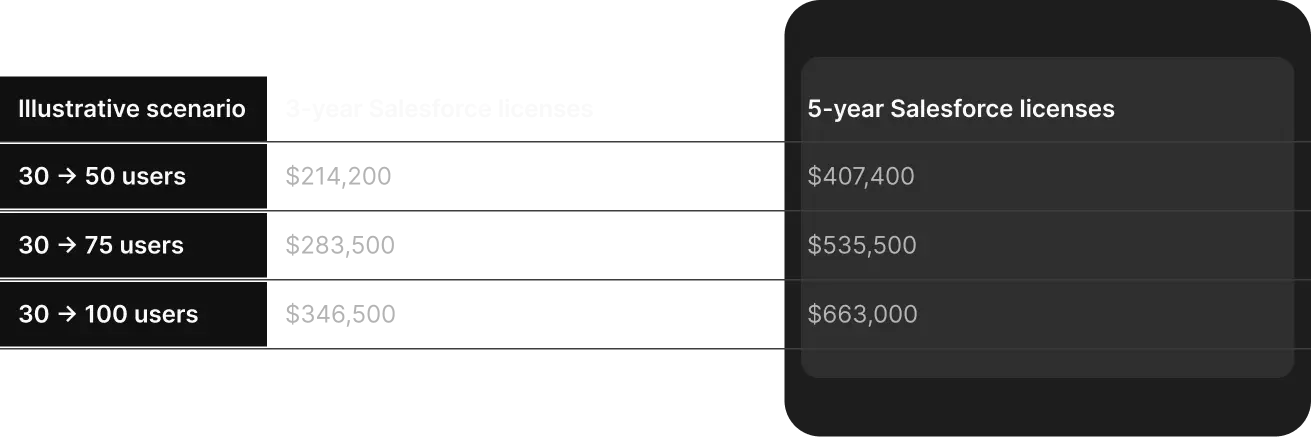
These are license-only calculations at the published $175 Enterprise rate. They exclude paid add-ons, custom work, administration, and other ownership costs. The custom CRM cost curve does not increase in the same way when you add users. This is a point where the CRM breakeven point becomes relevant.
If your business expects rapid headcount growth, high process complexity, and significant Salesforce customization, the long-term economics can shift toward custom software.
If your team stays relatively small and Salesforce already covers most of your requirements, the opposite can be true.
Beyond Cost: Customization, Flexibility, and Vendor Lock-In
One of the strengths of Salesforce is that it gives you extensive configuration options.
Think about what happens when your process no longer fits the standard model. You may be able to build the required process, but the cost and technical complexity can rise as you move further from the platform's standard patterns.
Vendor lock-in also deserves a place in the financial model. Salesforce provides documented methods for exporting data, so lock-in does not mean your data cannot leave the platform.
After five years, replacing the CRM can involve data mapping, system redesign, retraining, testing, and business disruption.
A custom CRM has the opposite trade-off.
You have more control over the data model and system architecture, but you also own the technical decisions. Poor architecture can create its own form of lock-in to a development team or technology stack.
When Salesforce Still Makes Sense
Salesforce can be the rational choice when your business needs broad capabilities quickly.
It is particularly attractive when:
- You operate at enterprise scale with established compliance and governance requirements
- Your business already has substantial Salesforce knowledge and existing systems
- You need access to a large marketplace of pre-built applications
- You lack the internal technical capacity to own custom software
- Your processes fit Salesforce's standard data model reasonably well
- Speed to deployment matters more than minimizing five-year software costs
So choose Salesforce when the platform already solves most of your problem and the cost of adapting your business to it remains lower than the cost of owning something custom.
When a Custom CRM Makes Sense
A custom CRM starts making financial sense when the CRM needs to reflect how your company actually operates. Consider it when:
- Your sales process does not map cleanly to Salesforce's standard objects and workflows
- You expect substantial user growth
- Your CRM needs to coordinate unusual operational processes
- You have complex connections to internal systems
- Your CRM itself creates competitive value
- You already own custom software and can extend its architecture
- You can fund long-term technical ownership
Our Harley-Davidson project, for example, involved CRM-related workflows built around a specific business context rather than forcing every requirement into a generic sales workflow.
The same principle appears in the AI furniture design platform, where software requirements are tied directly to a specialized product experience.
A Decision Framework: Build vs Buy for CRM

The build vs buy CRM decision should start with your five-year operating model, not a software demo.
Ask five main questions.
- How many users do you have today, and how many will you have in three and five years?
- Which CRM processes are standard, and which ones are specific to your business?
- How many external systems need to exchange data with the CRM?
- Who will own the software technically after launch?
- How quickly do you need the first production version?
A useful CRM decision framework also accounts for what happens if you choose incorrectly.
Questions to Answer Before Choosing Salesforce or a Custom CRM
Use this checklist before signing a new contract or renewing an existing one.
- What will our user count look like in 3 and 5 years?
- What Salesforce tier would we realistically need, not just the cheapest available tier?
- Which paid add-ons would we need?
- How much custom development do our current requirements need?
- How many system connections will the CRM require?
- What internal admin or RevOps capacity will we need?
- What will data migration cost if we leave later?
- Which CRM features do we really need?
- Which workflows give us an advantage?
- What would custom CRM development cost for our needs?
- Who would manage the system after launch?
- What would the TCO be over three and five years?
- When would our preferred option become too expensive?
For teams that need extra technical capacity, a dedicated development team can provide ongoing ownership without requiring you to build an entire engineering department internally.
The right build vs buy CRM decision is rarely about software alone, and it involves how much control you need and how much technical ownership you are prepared to take.
Final Thoughts
A CRM total cost of ownership comparison that stops at the license price misses a large part of the financial picture.
The right answer depends on your growth trajectory, process complexity, technical capacity, and the role your CRM plays in the business.
Our team works with businesses that need software around real operational workflows, from custom web development to dedicated engineering capacity and AI automation.
Alex Lozitsky
Co-founder and CEO