.png)
.avif)
%20copy.webp)
Imagine starting your day as a recruiter with 80 new applications. You search, review profiles, move candidates through stages, send messages, and check hiring manager feedback.
Now imagine that you open a new screen for every task, update candidates one by one, or run the same search again and again.
Your portal may look great, but soon you'll be back to a spreadsheet or your old ATS.
Why Most Job Portals Fail With Recruiters, Not Candidates
Most job portals focus first on the candidate experience because it is easier to show and promote. Things like search pages, job descriptions, application forms, employer profiles, and mobile layouts usually get the most attention.
Recruiters have a different experience because they work behind the scenes, and even small workflow issues can quickly add up. A recruiter may look at 100 applications for a single job. If it takes too many steps to open a profile, change a status, and get back to the list, that routine repeats 100 times. This is what happens when design puts candidates first and overlooks recruiters.
A portal might bring in lots of candidates, but if recruiters go back to spreadsheets, email, or old systems after a few weeks, the portal isn't really being adopted (even if it works as intended).
LinkedIn’s 2025 recruiting research found something similar. In a survey of 1,271 recruiters, those using generative AI said their workload dropped by about 20%. The main takeaway is that recruiters now expect technology to cut down on repetitive tasks, not just give them another tool to manage.
When recruiters do not use the tool, it also becomes a financial issue. You might spend months building features for candidates, adding integrations, dashboards, and reports. But if recruiters still handle candidates outside the portal, it will never become the main system you hoped for.
Who Actually Uses Job Portals, and What They Need
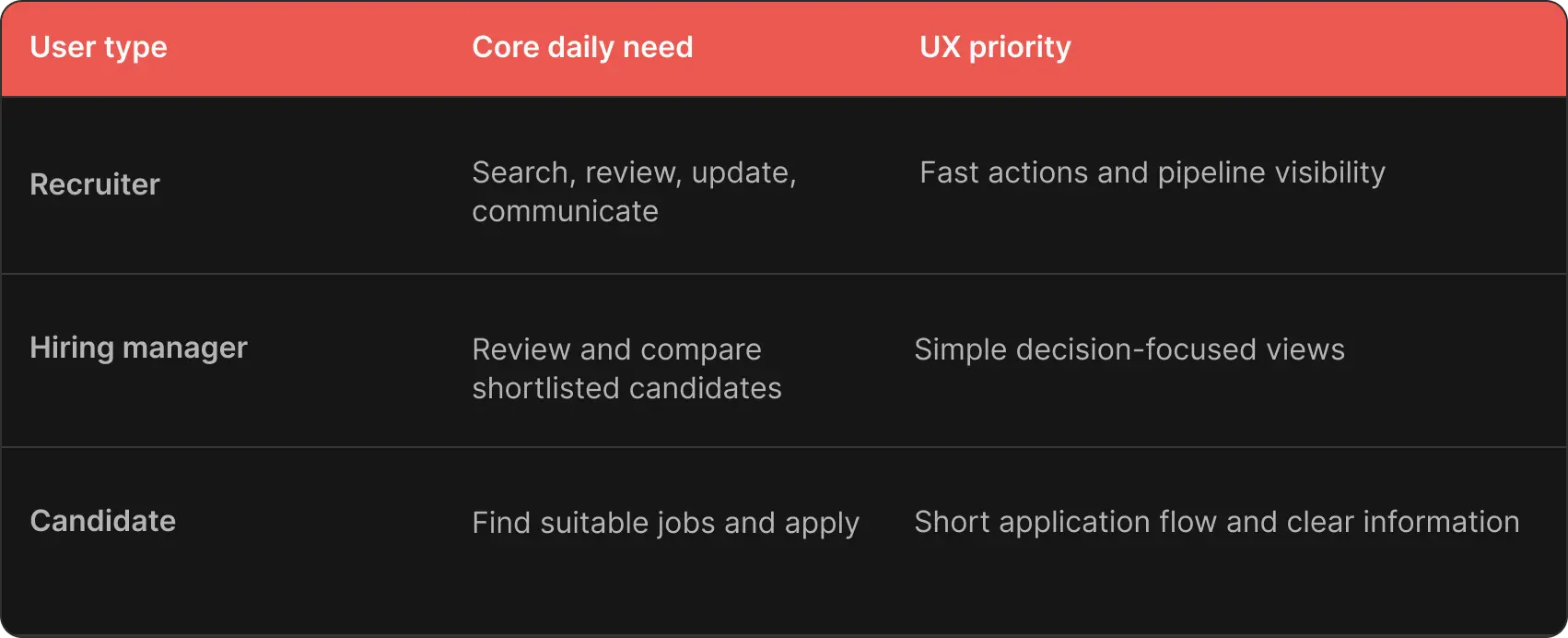
A recruitment platform usually has three main users: recruiters, hiring managers, and candidates, and they all use it differently. Recruiters want to work quickly and stay in control, hiring managers need enough information to make decisions, and candidates want to find the right jobs and apply easily.
The UX Fundamentals Recruiters Judge in the First Week
Recruiters judge a tool based on how it handles their daily tasks. Four main areas have the biggest impact on how usable a job portal is.
Search and filtering
If a recruiter needs to find candidates with specific skills, location, experience, availability, salary expectations, or other job-related criteria, the interface should reflect the way recruiters actually search.
Begin with the five or six filters recruiters use most. Make it easy to combine them, keep the chosen filters visible, and let users remove one filter without having to start the search over.
Pipeline visibility
Recruiters should be able to see candidates grouped by stage, with enough information to know what to do next. They should not have to open several screens to get all the basic information they need.
Bulk actions
If recruiters have to handle every candidate one by one, they’ll quickly get disappointed with the portal.
For example, if a recruiter needs to move 15 candidates to a new stage, tag eight people, or send the same message to several candidates, they should be able to do it from the candidate list or pipeline.
Bulk actions should also have some safeguards. Show how many candidates will be affected before the action is confirmed, and let recruiters undo actions when possible.
Notifications
A useful alert might say that a hiring manager submitted feedback or a candidate responded to a message. For example, telling recruiters that 12 candidates changed status overnight is not helpful unless they can do something about it right away.
If there are too many notifications, recruiters will start ignoring them.

Alex Lozitsky
Co-founder and CEO
Feature Prioritization: What Belongs in MVP vs What Can Wait
A common mistake is to treat every feature request as something that must be in the MVP. This leads to a big first release, but you still do not know if the main workflow actually works.
Start with the smallest set of features that lets recruiters and candidates complete the full hiring process.
.webp)
This approach helps you prioritize more focused features.
Designing the Application and Pipeline Flow
A good application process should work well for both candidates and recruiters: candidates want a quick way to apply, and recruiters need enough organized information to review applications later.
You do not need to ask candidates for every detail right away. Keep the must-have screening questions separate from the optional ones.
For example, a first application might request contact details, CV or profile, relevant experience, and location, and a small number of role-specific screening questions. If a candidate moves forward, you can always ask for more information later.
This approach also makes it easier to grow the platform as hiring needs become more complex. The Rocken project, for example, evolved from a simple job-listing site and CRM into a broader hiring platform as the business needed more recruitment workflows. In another project, The Starters, we connected data from several systems to reduce manual ranking and payment steps, showing how workflow automation can remove repetitive work behind the scenes.
The same idea works for designing the hiring pipeline, so you do not need to build a complex workflow tool right from the start. Begin with a simple default pipeline, and let admins rename, add, move, or remove stages as needed. Our work on the custom HR platform followed a similar principle, combining multilingual content and workflow automation with simpler administrative processes for recruiters.
A good application flow also makes sure users never hit a dead end. After applying, candidates should know what to expect next. When recruiters move someone to a new stage, the system should clearly show what action comes next.
The same applies to hiring managers: if five candidates need review, the product should take them straight to that task instead of a general dashboard.
Common Mistakes When Designing Job Portals
Improving the candidate side but ignoring recruiters
A great-looking job search page does not make up for a complicated workflow for recruiters.
Suppose candidates can apply in two minutes, but recruiters need eight clicks to move an applicant from screening to interview.
Building complex filters before testing search needs
Teams often add lots of filters just because the database has many fields, but recruiters may only use six regularly. Too many filter options make it harder to scan and choose, and can even hide the filters recruiters really need.
So it makes sense to start by watching how recruiters actually search, finding the criteria they use most, and designing your filters around those habits.
Ignoring recruiters on mobile
Recruiters and hiring managers often check candidates on devices other than a desktop.
A hiring manager may receive a notification while traveling and want to approve a shortlist from a phone.
You do not need to reproduce every desktop function on mobile, so identify the actions that make sense on a smaller screen.
Too many notifications
During development, a notification system may seem helpful to you because every event creates a clear message. But after launch, you may notice that too many low-value alerts just become background noise.
You can group similar events, focus on alerts that need action, and let users choose how and how often they get notifications.
Building without regular recruiter feedback
Talking to stakeholders is useful, but it’s not enough. A product owner might explain to you how recruitment is supposed to work, but a recruiter can show you how it really works day-to-day.
In Rocken’s recruitment platform case, for example, our team had to study three flows: how candidates search and apply, how employers evaluate and communicate, and how career consultants work internally. Based on the findings, the team later changed UX, filters, and page structure. This way, we learned the workflow with real users and avoided building on assumptions.
A Checklist Before You Start Building
Go through this checklist before you spend your full development budget.
- Have you talked to real recruiters about how they work every day?
- Do you know the three things recruiters do most often?
- Does your pipeline match how your hiring process actually works?
- Can recruiters do their three main tasks in three clicks or less?
- Can recruiters search for candidates using the filters they actually need?
- Can they update several candidates at once?
- Can hiring managers review shortlisted candidates without learning the whole system?
- Can hiring managers use the key features from their phones?
- Have you decided which features you really need for the MVP?
- Have you separated must-have features from things you can add later?
- Have you tested the application flow with real candidates?
- Which recruiter actions indicate the portal is working well?
You can also include this job portal checklist in your product specs. It gives your team a clear way to decide what matters most when new requirements come up.
Final Thoughts
The best hiring platforms focus on simple things: fewer clicks, clear candidate status, fast search, helpful bulk actions, and obvious next steps.
If you are building a job portal for recruiters, focus on the tasks they do every day. Then shape the candidate experience around a hiring process recruiters can really manage. This is where custom technology can really help.
Alex Lozitsky
Co-founder and CEO